JS Objects and Methods
Objects are powerful data structures that allow you to organize related data into a single entity.
Object Creation
In this example, an object named “car” has been created with the following properties:
let auto = {
        mark: "Mazda",
        mudel: "cx-5",
        aasta: 2021,
        varv: "valge",
        lisavarustus: ["kliimaseade", "elektriaknad", "navigatsioonisüsteem"]
    };
    console.log(auto);
We also use console.log() to display this object and all the properties we wrote in the console.

The properties of each object can be accessed using dot syntax.
console.log(auto.mark);
console.log(auto.mudel);
console.log(auto.aasta);
Object methods and using “this”
Objects in JavaScript can contain not only properties, but also methods. Methods are functions of an object.
The keyword “this” is used inside methods to refer to the object on which the method is called.
let auto2 = {
        //omadused
        mark: "Mazda",
        mudel: "cx-5",
        aasta: 2021,
        varv: "valge",
        lisavarustus: ["kliimaseade", "elektriaknad", "navigatsioonisüsteem"]

        //meetodid
        taisnimi: function() {
            return this.mark + " " + this.mudel;
        }
    };

    console.log(auto.taisnimi());
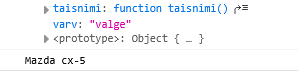
Method abbreviation
The new Javascript ES6 now allows you to write methods in a shorter format.
  taisnimi2() {
    return this.mark + " " + this.mudel;
  }
Object Arrays
These are data structures that contain many objects in an order.
Creating and displaying an array of objects
Here is an array of cars, which contains 3 car objects, all objects have the same properties.
let autod = [
  { mark: 'Mazda', mudel: 'CX-5', aasta: 2015 },
  { mark: 'Porsche', mudel: '2', aasta: 2022 },
  { mark: 'Wolkswagen', mudel: 'Model 3', aasta: 2020 }
];
If we want to see the data for a specific car, we can reference the car’s position in the array. And in this object, I can retrieve the elements with the “dot syntax”, as above:
console.log(autod[0]);
console.log(autod[0].mark);
forEach Loop
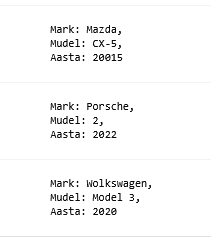
To see all the models, we use the forEach loop again:
autod.forEach((auto) => {
  console.log(`
    Mark: ${auto.mark},
    Mudel: ${auto.mudel},
    Aasta: ${auto.aasta}
    `);
});
Object Array Methods
push(), pop(), shift(), unshift(), splice(), slice(), forEach(), map(), filter(), reduce(), sort(), etc.
push() – Adds a new object to the end of the array.
autod.push({ mark: 'BMW', mudel: '320i', aasta: 2015 });
unshift() – Adds a new object to the beginning of an array.
autod.unshift({ mark: 'Ford', mudel: 'Focus', aasta: 2020 });
splice() – Deletes and adds at the same time.
massiiv.splice(
  {start indeks},
  {mitu eemaldada},
  {mida lisada}
);
// Deletes the first object
autod.splice(0,1);

//Adds an object before an index, doesnt delete anything
autod.splice(1,0,{ mark: 'Audi', mudel: 'A4', aasta: 2018 });
Array Searching
Note that this only returns one element that is found. This method finds the first match and returns it.
let otsing = autod.find(auto=>auto.aasta > 2018);
console.log(otsing);

Note that this only returns one element that is found. This method finds the first match and returns it.
Array Filtering
For example, we have numbers and we want to get an even number from them:
let arvud = [1, 2, 3, 4, 5, 6, 7, 8, 9, 10];

const filtreeritud = arvud.filter(arv => arv % 2 === 0);
console.log(filtreeritud);

For cars, we can, for example, go to car.year and filter for those newer than 2018.
let filter = autod.filter(auto=>auto.aasta > 2018);
console.log(filter);

Array Sorting
The difference with filtering is that it does not find a new array, it only changes the array that is given. Simply sorting an array of objects does not work correctly. Therefore, we need to use a comparison function.
// kui a - b annab arv mis on > 0, siis a läheb esimeseks järjekorras. See funktsioon töötleb kõikidel objektidel massiivis
autod.sort((a, b) => a.aasta - b.aasta);
console.log(autod);

Task
Raamat
- Loo objekt
raamat, millel on vähemalt kolm omadust:pealkiri,autor,aasta. - Lisa meetod, mis kuvab raamatu kirjelduse.
- Lisa meetod, mis muudab väljaandmise aastat ja prindi tulemused konsooli.
Code:
Raamatukogu
- Loo objekt
raamatukogu, mille omaduseks onraamatud(massiiv raamatutest). - Lisa meetod, mis kuvab kõik raamatud kenasti konsoolis.
- Lisa meetod, mis lisab uue raamatu.
- Lisa meetod, mis kuvab raamatukogu raamatute koguarvu.
- Lisa meetod, mis arvutab, mitu raamatut on ilmunud pärast 2000. aastat.
- Koosta oma meetod ja kirjuta mida meetod tähendab